
Change the Hostname
Rename your VPS from the control panel, and what to do about reverse DNS.
The hostname is the name your server calls itself, for example my-vps.example.com. You choose it when you order the VPS, and you can change it later from the control panel.
Open the VPS settings
In the control panel, open List VPS, click the Manage (cog) icon of your server and go to the Settings tab.
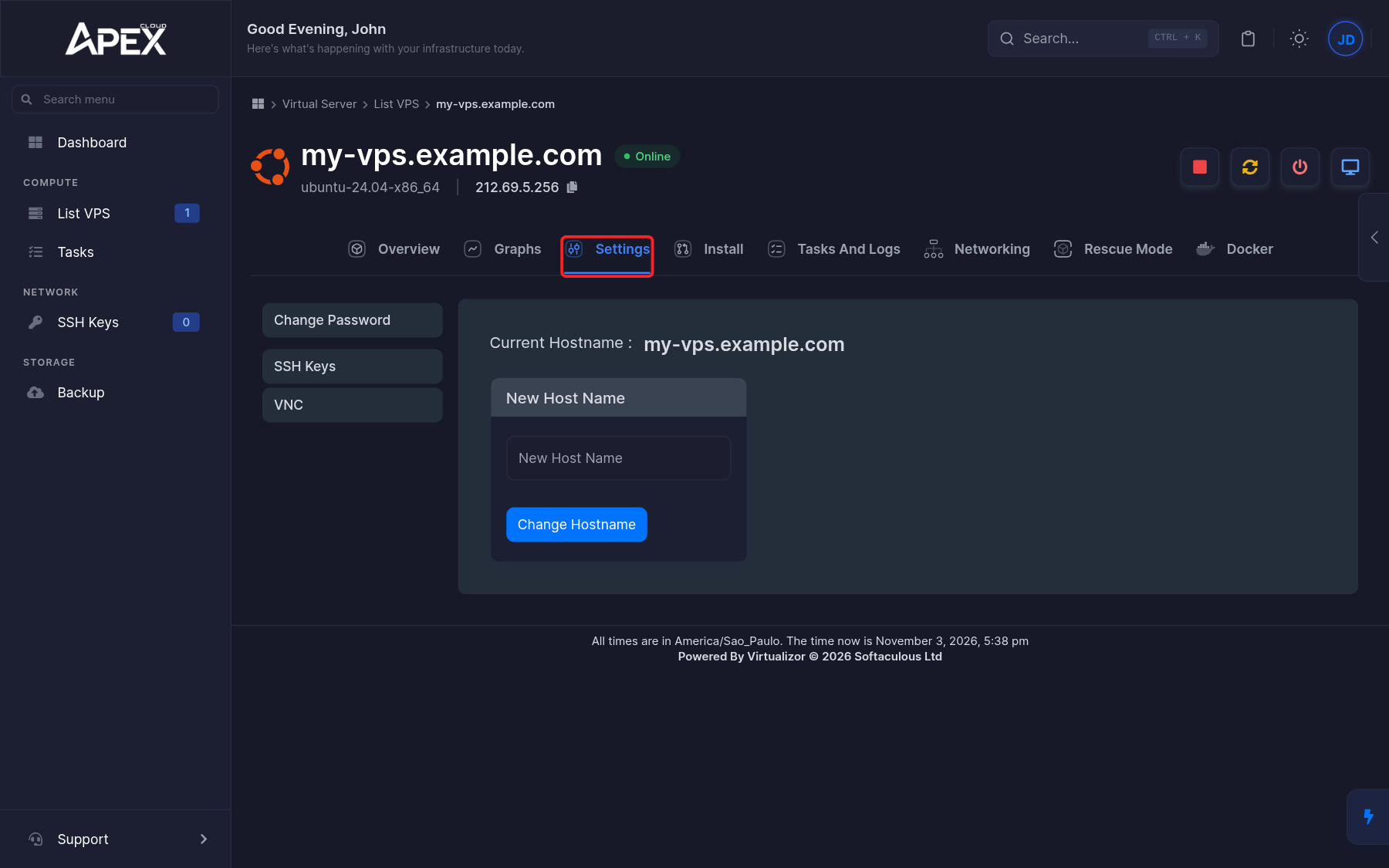
Enter the new hostname
The hostname panel is the one shown by default. Current Hostname shows the name in use. Type the new name in New Host Name and click Change Hostname.
Check the result
Reload the management page and check the name in the header. On a Linux server, you can also run hostname over SSH.
Use a valid hostname: letters, numbers and hyphens, separated by dots if it is a fully qualified name.
Reverse DNS (PTR)
Reverse DNS cannot be changed from the panel
The control panel has no option to edit the reverse DNS (rDNS or PTR record) of your IP address. If you need a PTR record, for example to send email from your server, contact support and tell them which IP address and hostname you need.
Changing the hostname does not change reverse DNS, and it does not create a DNS record. To point a domain name at your server, add an A record at the DNS provider of your domain, with the server's public IP address.