
Cancel a service
Cancel at the end of the billing period or immediately, and what each choice means.
You can cancel a service yourself from the Billing Panel. To stop a service from renewing, cancel it before the due date of the next invoice, see Renewals and overdue invoices.
Immediate cancellation destroys the service
Cancel immediate destroys the service right away. Download what you need first. Choose Cancel at the end of the billing period if you only want to stop future renewals.
Cancel a service
Open the service
Go to Services, select the service, and under Actions select Cancel. See Your services.
Choose the cancellation type
In the dialog Cancellation of (followed by the product name), pick Cancellation Type:
| Type | Effect |
|---|---|
| Cancel at the end of the billing period | The service keeps running until the period you paid for ends, and is not renewed |
| Cancel immediate | The service is cancelled now. Access can stop immediately |
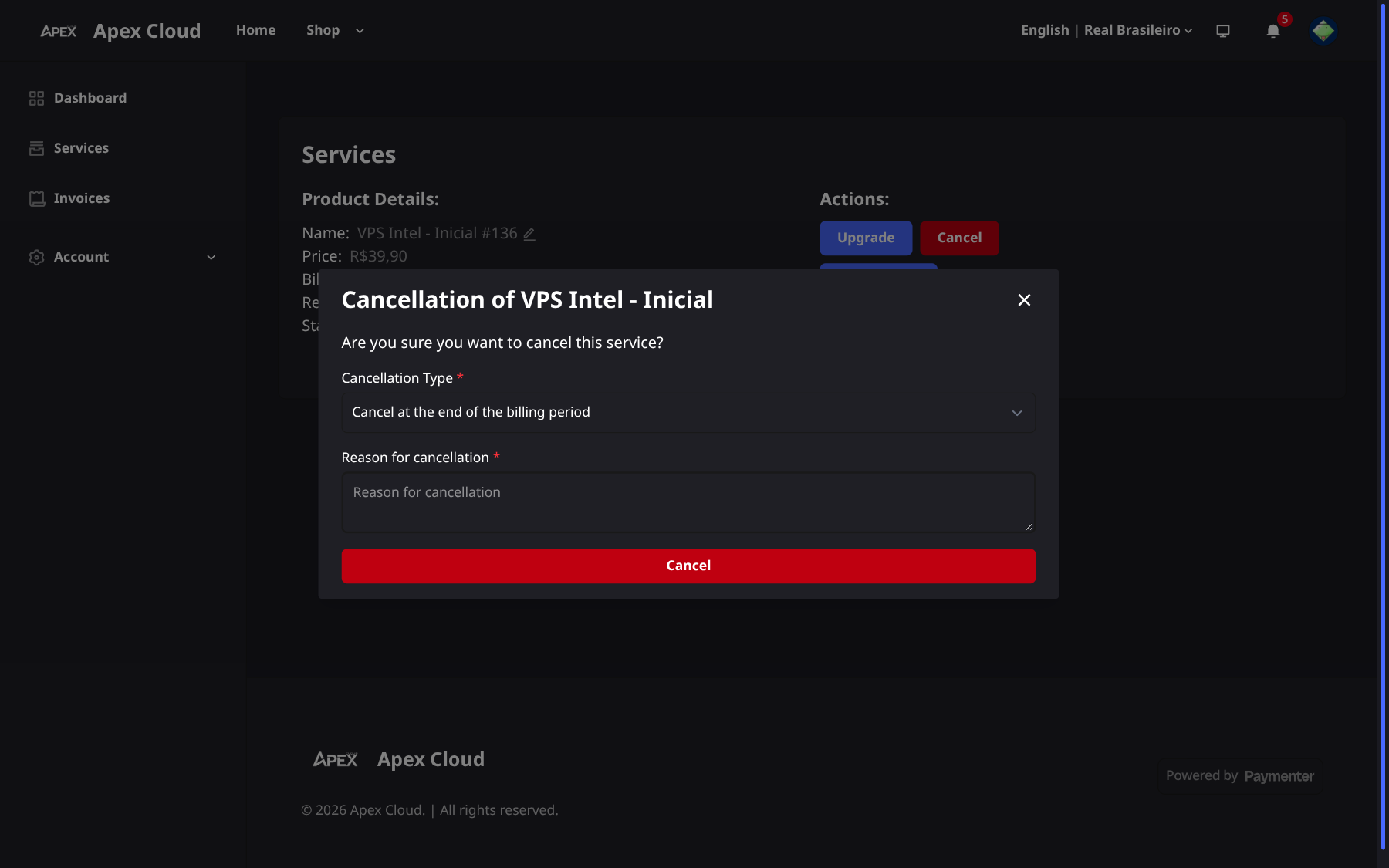
Give a reason
Reason for cancellation is required. Write a short sentence.
Confirm
Select the red Cancel button.
Refunds
Cancelling does not by itself return money. Under the Terms of Service, cancellation does not guarantee an automatic refund unless the request falls within the 7-day guarantee. If you cancel because the service did not meet your expectations, read Refunds and the 7-day guarantee first.
Related
- Upgrades: need a different plan instead of no plan?
- Your services