
Activity log
See who started, stopped or restarted the server, sent a command or changed a setting.
Activity in the server menu is the audit log of your server. Every important action is recorded with who did it and when, which helps when something changed and nobody knows why, and when several people have access to the same server.
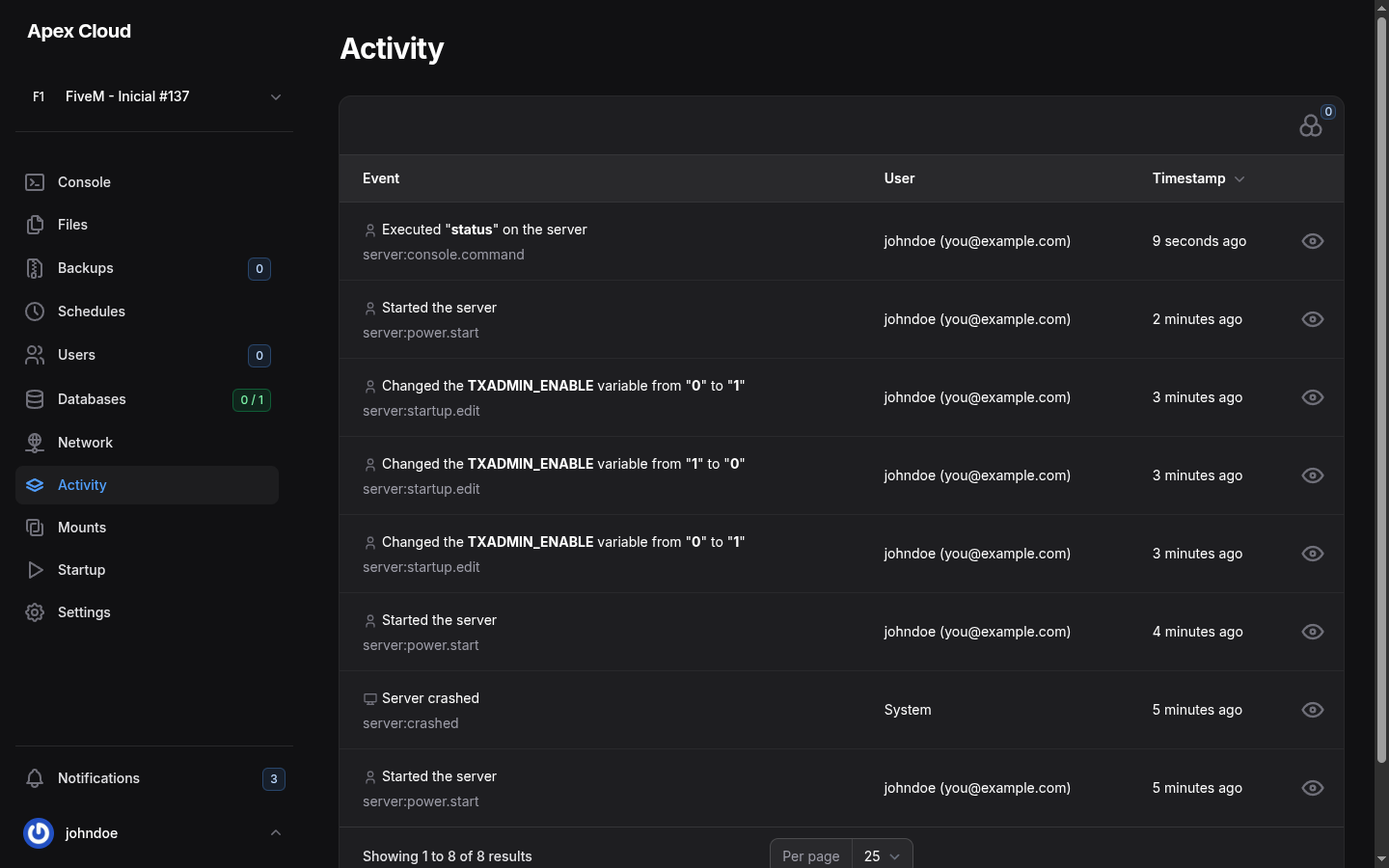
What each row shows
| Column | Meaning |
|---|---|
| Event | A sentence describing what happened, with the event code below it (for example server:power.start) |
| User | The panel user who did it, with their email. Events caused by the system itself, such as a crash, show System |
| Timestamp | How long ago it happened. Select the column to sort |
The list is paged, with Per page at the bottom.
Events you will see
These are the events seen on a server:
| Event | Code | Example text |
|---|---|---|
| A command typed in the console | server:console.command | Executed "status" on the server |
| The server was started | server:power.start | Started the server |
| A startup variable changed | server:startup.edit | Changed the TXADMIN_ENABLE variable from "0" to "1" |
| The server crashed | server:crashed (user System) | Server crashed |
The panel also records other actions the same way, for example restarts and stops, and file changes. Each one has its own event code in the form server:<area>.<action>.
Use it to find a crash
A Server crashed entry with System as the user, right after a Started the server, means the game process exited by itself. Check the Console at that time for the reason, see Troubleshooting.
Filter the list
The filter icon at the top right of the table (it shows a counter with the active filters) opens Filters with two choices:
- Event: pick an event code, such as
server:power.start, to see only that kind of event. - User: pick one of the users to see only what they did.
Select Apply filters to apply them.
Who can use it
Only people with the Read permission of the Activity group of Users can open this page. It is separate from the other groups, so you can let a moderator restart the server without letting them read the log.