
Startup
The startup command, the server variables and the Docker image of your server.
Startup in the server menu controls how your game is started: the command that runs, the variables that command uses and the Docker image the server runs in. What you can change depends on the game.
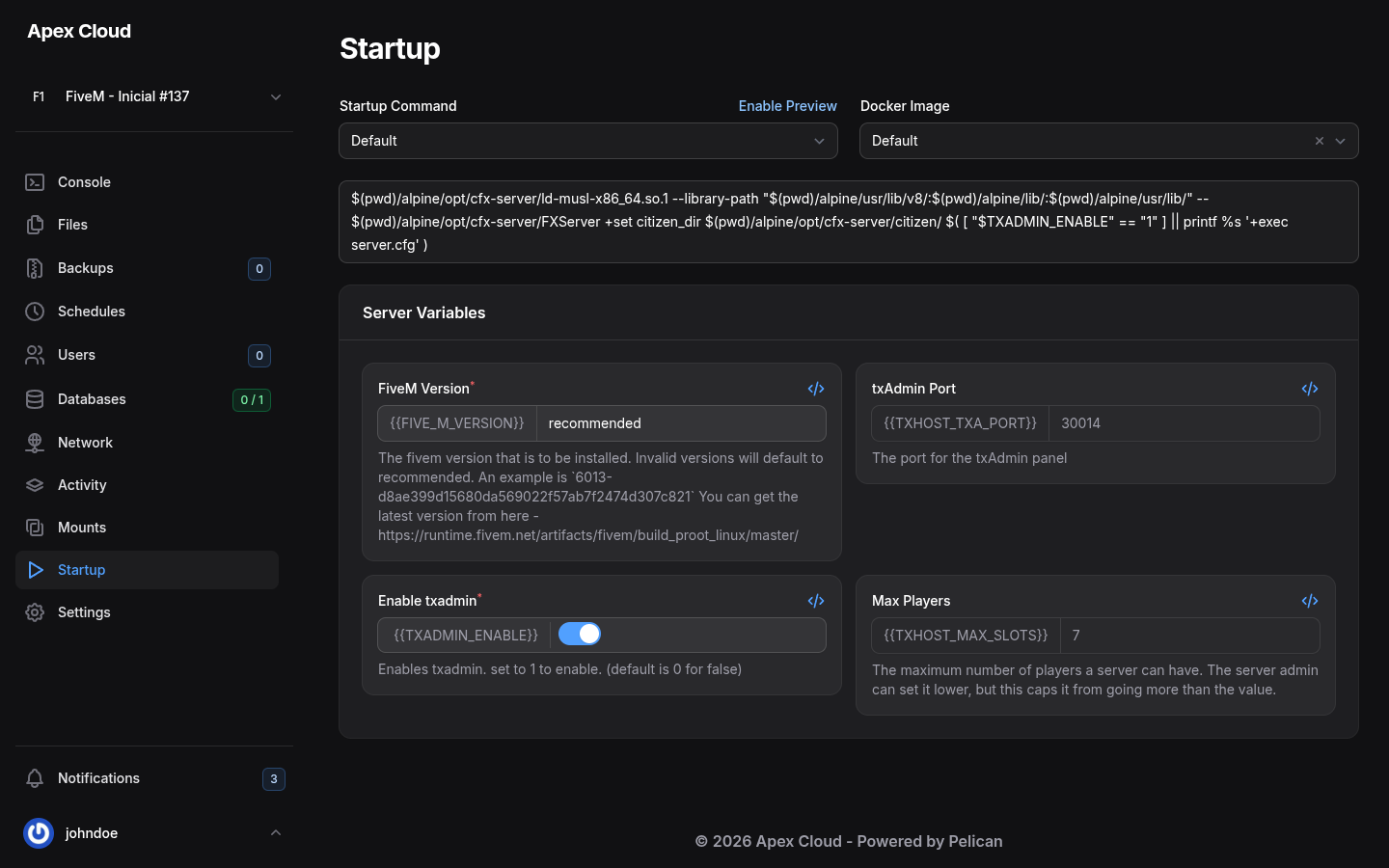
Startup command
Startup Command is a selector that is set to Default. The command is shown in a box below it. The box is read-only: you cannot type in it.
The Enable Preview link above the box turns into Disable Preview when selected.
The command uses your server variables. For FiveM, for example, it starts FXServer, and adds +exec server.cfg only when Enable txadmin is off.
Docker image
Docker Image is the software environment the game runs in. For the FiveM server of this example the only choice is Default. For games that offer several images, the choices appear in this selector, and the server must be restarted to use the new one.
Change the image only when a guide tells you to
A wrong image can stop the game from starting. For example, a Minecraft version needs a matching Java image, see Minecraft. If the server will not start after a change, set the selector back to Default.
Server variables
The Server Variables boxes are the settings the startup command reads. Each box shows its name, the variable it fills (for example {{TXADMIN_ENABLE}}), the current value and a description. A red star after the name marks a required variable.
For the FiveM game on Apex Cloud they are:
| Variable | What it does | Can you change it? |
|---|---|---|
| FiveM Version | The FiveM server build to install. recommended uses the recommended build. A wrong value falls back to recommended. You can paste a specific build number from the FiveM artifacts page | Yes |
| txAdmin Port | The port of the txAdmin web panel | No, it is assigned to your server, see Network |
| Enable txadmin | Turns txAdmin on (1) or off (0). Off by default | Yes, it is a switch |
| Max Players | The most players the server can have. The server can set a lower number, but not a higher one | No, it comes from your plan |
The boxes you cannot edit are greyed out.
Change a variable
Change the value (type in the box, or use the switch).
There is no Save button: the panel saves as soon as you change it, and shows a message such as Updated: Enable txadmin 0 → 1. The change is also recorded in the Activity log, for example Changed the TXADMIN_ENABLE variable from "0" to "1".
The new value is used the next time the server starts, so restart it from the Console.
FiveM: txAdmin
With Enable txadmin on, the server starts txAdmin instead of running server.cfg directly, and txAdmin prints the address of its web panel and a PIN in the console. Setting up FiveM is covered on the FiveM page.
Who can use it
The Startup group of Users has three permissions: Read the variables, Update them, and Docker Image to change the image.